Time Shift Setup
This option allows you to pause and rewind Live TV. This function operates by recording temporarily to a storage device. Please ensure your storage device is connected and there is enough free disk space, otherwise timeshift will not function.
In Live TV, press  /
/ button on your remote control and select , then the playback bar will appear.
Alternatively, you can launch Timeshift just by pressing  /
/ button.
If your remote control has  button, press it and press
  button to launch Timeshift.
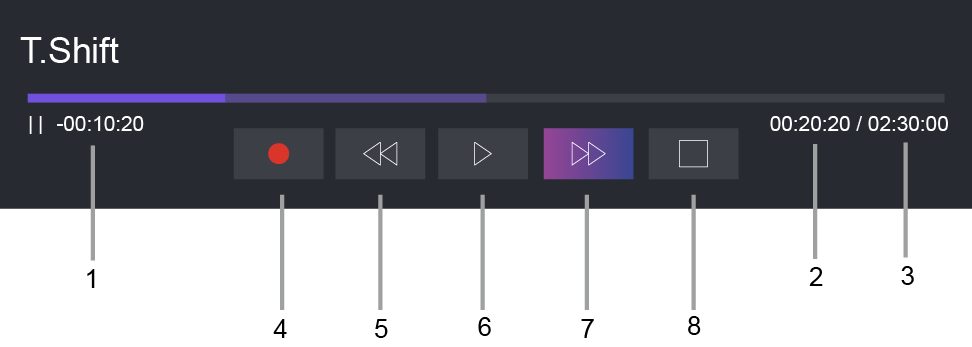
- Unwatched time for buffered content
- Current time
- Total time
 Record: to convert a Timeshift to a live recording of the current broadcast channel. Select and the program content you have watched in Timeshift will also be saved to the storage device.
 Fast backward: you can choose 2×, 4×, 8× or 16×.
 Pause/
 Play
Play Fast forward: you can choose 2×, 4×, 8× or 16×.
 Stop Timeshift: to exit the function and watch the current broadcast.
Note:
- The Timeshift function does not support analog channels.
- The storage space of the device should be no less than 2GB. It is strongly recommended to use a USB mobile hard disk drive instead of a USB flash drive as the storage device.
- The Timeshift function may not be applicable in some models/countries/regions.